Your Repo Is Public. Your Thinking Isn't.
The reasoning behind your code deserves a history of its own. How I keep mine private, versioned, and within reach of the next agent session.
You start a fresh agent session in a project you know well. It reads the code, proposes a reasonable approach, and you recognize it immediately: the approach you ruled out weeks ago.
Now you’re explaining the constraint and the trade-off all over again. The reasoning survived somewhere, but it didn’t make it into this session.
That was the problem I kept circling. My projects often start privately and get shared later. The thinking behind them scattered across Obsidian, gitignored notes, and agent memory. I could find the context, given enough hunting. Getting it in front of the next agent was another job.
Putting everything in the code repo would make it easy to find. But a repo I’m comfortable sharing isn’t necessarily a place I’m comfortable thinking out loud. Half-formed plans need room to change. Operational notes can contain details that have no business in public. A rejected idea shouldn’t become a roadmap promise because I needed somewhere to write it down.
I wanted that reasoning versioned and available to the work, with a separate decision about what gets shared.
That’s why I built Dotbrain.
Give the thinking its own history
Dotbrain is a local CLI and a plugin for Claude Code and Codex. It gives each project a private Brainspace outside the code repo: a Brain for knowledge, alongside an execution store for issues and dependencies.
The Brain holds ordinary files. Vocabulary makes the project’s terms explicit. Decision records preserve why one approach won over another. Designs hold the intent of work in progress. Runbooks hold the instructions I’d otherwise have to rediscover during a problem.
Those files live in a private home, conventionally ~/dotbrain, that I version with Git. I can review how a decision changed, recover an earlier plan, or correct an explanation without making any of it part of the code repo’s history.
Dotbrain uses Beads as its private issue tracker for tasks and dependencies. Wiring brings the Brainspace within reach of the project through two links: .brain points to the Brain’s knowledge files, and .beads points to the issue tracker’s local directory. The tree shows where the private material lives and how the code repo reaches it:
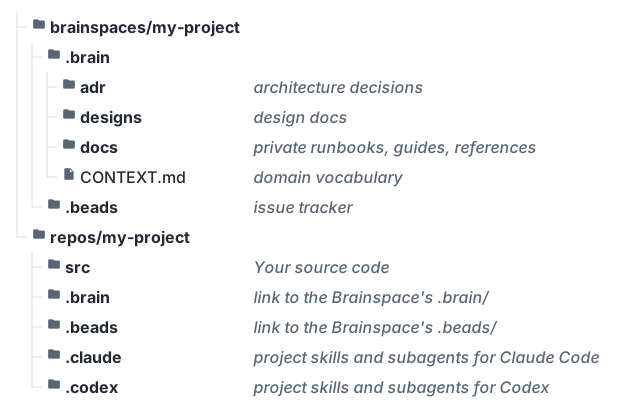
The code repo’s .brain and .beads entries are ignored symlinks to the private Brainspace. In this example, their full targets are ~/dotbrain/brainspaces/my-project/.brain and ~/dotbrain/brainspaces/my-project/.beads. The agent workspaces, .claude and .codex, stay real directories. Dotbrain links selected skills into both, links Claude Code’s subagent definitions, and generates Codex’s TOML definitions without taking over the files the project already owns.
The editor and agent can reach the private material through the project tree. Git in the code repo ignores the wiring. The reasoning gets a history of its own, while the code keeps the history I’m willing to share.
Gitignore can hide context, but it can’t carry it
A gitignored notes folder is the obvious smaller solution. I used some version of one for years.
It works until the work moves. A fresh worktree doesn’t inherit those notes. A clone on another machine doesn’t bring them along. The code arrives, and the context stays wherever I last remembered to put it.
At that point I can copy files, maintain another synchronization arrangement, or let the agent infer the missing decisions. The last option looks cheapest because it asks nothing of me up front. I pay later, explaining a constraint after the agent has already built against the wrong assumption.
With Dotbrain, wiring a Git worktree connects it to the main checkout’s existing Brainspace. Both reach the same knowledge and issue store. There isn’t a second set of notes to reconcile when the worktree goes away.
On another machine, I clone the private home and wire the checkout there. The Brain travels through Git; the Beads database needs its own synchronization or backup through a Dolt remote or shared server. Cloning the home alone doesn’t recover the issues.
That still takes setup. But it’s a setup I can repeat, rather than a context rescue I perform whenever the work changes location.
Start with a map, then read what matters
Making context available is only half the job. Loading every decision, design, and runbook into every session would create a different problem: the useful detail buried under everything else.
The plugin’s session-start hook loads the shared Dotbrain convention in a wired repo. It tells the agent where the Brain is, how the material is organized, and what must stay private. The agent then reads the project’s rules and follows the context relevant to the task.
I can inspect those same files. If an explanation is wrong, I can correct it. If a decision has changed, I can record what replaced it. The project doesn’t have to depend on whichever version of the story an agent remembers from an old conversation.
Working practices have a home too. The plugin supplies Dotbrain’s bundled skills, and I can select additional skills and subagents for each project. Moving between Claude Code and Codex doesn’t have to mean rebuilding that setup by hand.
Planning without an audience
A public issue tracker is a particularly awkward place to think out loud. A tentative milestone looks like a commitment. An abandoned idea can look like a promise I failed to keep.
I want public reports and questions to be visible. I also want room to work out dependencies, change priorities, and discover that a requested feature needs a different design.
So I keep execution state in Beads, behind .beads, and use public issues for intake. A report can lead to private investigation and implementation, then a fix and an explanation written for the person who reported it. The public outcome doesn’t need the whole history of how I arrived there.
The design holds current intent, the tracker holds execution state, and the Brain preserves what should outlive the work. I go into that loop in The loop I use to ship features with AI.
The filesystem makes the separation easier to maintain. It doesn’t make it foolproof. An agent can still read a private note and copy its contents into a public commit message. Symlinks guard where files live, not where words end up.
That’s why the shared convention includes rules for public output. Knowledge worth sharing becomes a fresh document for that audience. A private investigation might lead to a public troubleshooting guide; the internal runbook and rough plans can stay behind.
Review still matters. The tool gives private thinking a place to live; I remain responsible for deciding what leaves it.
The person needs context too
An agent having the right explanation doesn’t mean I understand the project any better.
The Brain can also become a local reading site, with search, navigation, and rendered diagrams. I can follow a runbook back to the decision that explains it, or look up a term without remembering which Markdown file contains it. Dotbrain serves that site locally; it doesn’t publish the material.
The teach-me skill takes this further. It uses the Brain and current code to explain a project topic, check understanding, and carry a learning path across sessions. Questions that arise during implementation can be saved for later. Lessons and records of demonstrated understanding stay in the private Brain.
For work I intend to maintain, that’s a useful extension of the original idea. The knowledge should help the agent make a sound change and help me understand the change well enough to own it.
The disciplined path has to be the lazy one
Anyone reading this could assemble much of the same arrangement: a private repo, ignored links, and a convention for where things belong. Dotbrain earns its place only if maintaining that arrangement is easier with the tool than without it.
There are costs. I maintain a private home, install a plugin and CLI, and manage Beads when I use it. The Brain needs a private backup; the tracker needs its own. Changes to machines and configuration can require refreshing the wiring.
If a short AGENTS.md covers a project’s needs, I’d keep it that simple. The extra setup becomes worthwhile when the alternative is repeatedly hunting for reasoning, copying notes between checkouts, and explaining decisions that should already be available.
That’s the bar: preserving the thinking has to cost less than reconstructing it.
The next session should be able to start from what the last one learned. Sharing the code shouldn’t require sharing every thought that got it there.
You can find the documentation and source code online. Your project’s thinking keeps its own home.